Why Teachers Need GoHighLevel AI Assistants
Education, Classroom Technology, AI Assistants
7 Reasons Every High School Teacher Needs a goHighLevel AI Employee
High school teachers juggle lesson planning, grading, parent communication, behavior management, and endless admin work. A goHighLevel AI Employee acts like a tireless digital teaching assistant, helping you reclaim time, reduce stress, and support students more effectively—without replacing the human heart of your classroom.
1. Your AI Employee Handles Routine Communication 24/7
Late-night parent emails, “What did I miss?” messages, and repeated questions about due dates can quietly eat away hours each week. A goHighLevel AI Employee can automatically answer common questions, share assignment details, and send reminders—any time of day—so you don’t have to live in your inbox. Parents and students get fast, clear responses, while you focus on teaching instead of typing the same reply for the tenth time.
📌 Key Takeaway: Let your AI Employee handle FAQs and routine messages so your inbox stops controlling your evenings.
2. It Streamlines Parent Engagement and Updates
Consistent communication builds trust, but it’s hard to keep every family in the loop. With goHighLevel, your AI Employee can send automated, personalized updates about upcoming tests, project milestones, missing work, or behavior notes. Instead of manually crafting dozens of messages, you set the tone and rules once, and the AI handles the ongoing outreach—keeping parents informed without adding more to your plate.
“Parents don’t need longer emails—they need timely, clear updates they can actually act on.”
3. It Helps Track Assignments and Student Follow-Up Effortlessly
Missing assignments and late work can quickly snowball. A goHighLevel AI Employee can track who hasn’t turned in key tasks and automatically send gentle reminders to students—and, when appropriate, to parents. You can set different messages for first, second, or final reminders, ensuring that no student slips through the cracks while you avoid the mental load of keeping every missing assignment in your head.
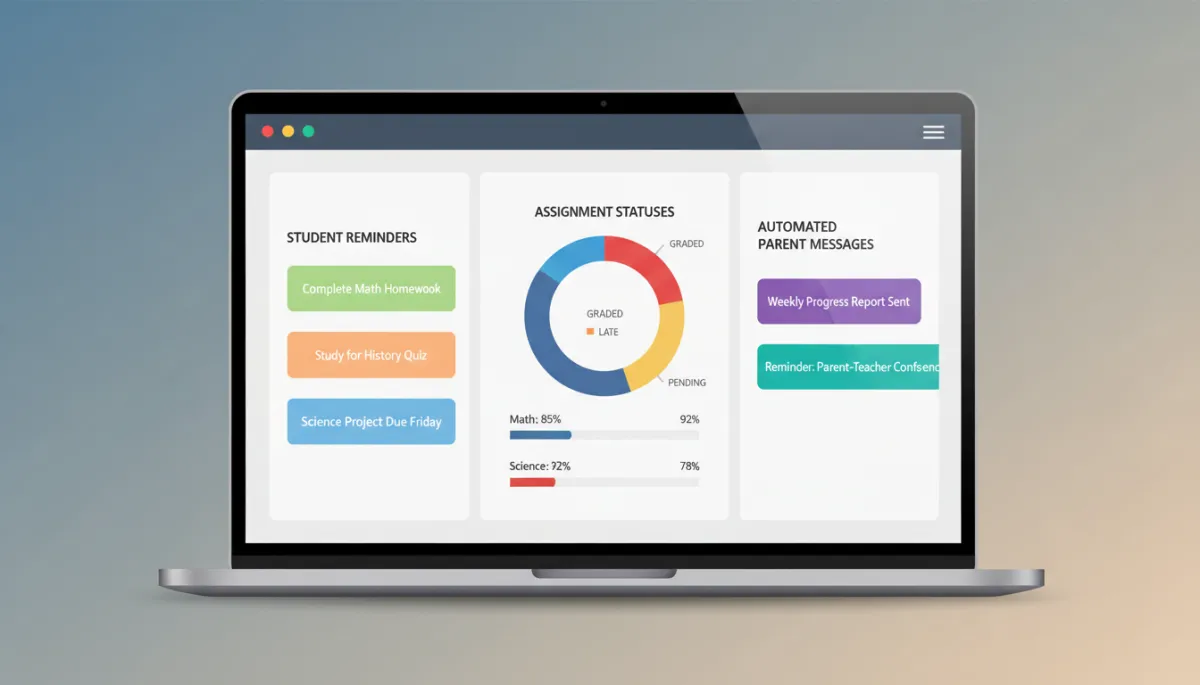
Automated follow-ups ensure no assignment or student quietly disappears from your radar.
4. It Reduces Administrative Overload and Paperwork Churn
Field trip forms, permission slips, survey links, event reminders—administrative tasks never end. Your goHighLevel AI Employee can automate sign-up confirmations, send follow-up texts or emails, and organize responses into simple lists. Instead of chasing signatures or manually updating spreadsheets, you get organized information and clear records, freeing your evenings from tedious clerical work.
💡 Pro Tip: Use your AI Employee to collect and sort responses for one recurring task—like permission slips—before you hand it more admin work.
5. It Supports Differentiation with Smart, Timely Nudges
Every class includes students who need extra reminders, encouragement, or clarity. A goHighLevel AI Employee can send tailored messages based on performance or behavior triggers you define—such as extra study tips before a test, congratulations for improvement, or resources for students who are falling behind. You remain the decision-maker, but the AI helps deliver those targeted nudges at the right moment, at scale.
Thoughtful automation doesn’t replace relationships—it gives you more time to deepen them.
💡 Pro Tip: Start with one group—such as students with missing work—and let your AI Employee handle all reminders for that group before expanding to more workflows.
6. It Gives You Actionable Insights About Your Classes
Because your goHighLevel AI Employee tracks messages, responses, and key milestones, it can reveal patterns you might miss in the daily rush. You can quickly see which classes respond best to text reminders, which assignments generate the most questions, or which families rarely open emails. These insights help you adjust your communication, refine your lessons, and advocate for your students with real data instead of guesswork.
7. It Protects Your Time and Energy So You Can Teach at Your Best
Burnout is one of the biggest threats to great teaching. By offloading repetitive, time-consuming tasks to a goHighLevel AI Employee, you protect your most valuable resource: your energy. Instead of staying late to catch up on emails or reminders, you can invest that time in creative lesson design, meaningful feedback, or simply resting and recharging. The AI doesn’t replace your role—it safeguards it, so you can stay present, patient, and passionate in front of your students.
📌 Key Takeaway: When you protect your time and focus, your students get the very best version of you.
Bringing an AI Employee into Your Classroom World
High school teaching will always be deeply human work. But that doesn’t mean you have to do everything by hand. A goHighLevel AI Employee becomes the reliable, behind-the-scenes teammate you’ve always needed—managing communication, tracking tasks, and surfacing insights while you focus on building relationships and inspiring learning. Start small, automate one or two workflows, and let your AI Employee prove just how much lighter the school year can feel.
Ready to Put a goHighLevel AI Employee to Work for You?
If you’re ready to reclaim your time and simplify classroom communication, you don’t have to figure it out alone. You can get your free 30-day trial of goHighLevel at teachleadandinspire.com/bootcamp or schedule a free implementation onboarding call at teachleadandinspire.com/calendar to get everything set up for your unique classroom.
💡 Pro Tip: Bring one current pain point—like late work, parent communication, or behavior tracking—to your onboarding call so your AI Employee is solving a real problem from day one.
Watch How to Use GoHighLevel and Build Your Teacher AI Assistant
Want to see exactly how this works in a real classroom workflow? Watch the step-by-step training on using GoHighLevel to build your own Teacher AI Assistant and follow along as you set up your first automation.
📌 Learn More: The training walks you through creating your AI Assistant from scratch—no tech background required.
Frequently Asked Questions About a goHighLevel AI Employee
Still wondering how an AI Employee actually fits into your day-to-day teaching life? These quick answers address the most common questions high school teachers ask before getting started.
1. Will an AI Employee replace me as a teacher?
No. A goHighLevel AI Employee is designed to handle repetitive, administrative, and communication tasks so you can spend more time teaching, coaching, and connecting with students. You stay in control of the tone, rules, and workflows—it simply executes them consistently in the background.
📌 Key Takeaway: Think of your AI Employee as a reliable digital assistant, not a replacement for your professional judgment or relationships.
2. Is it hard to set up and learn?
Setup is intentionally teacher-friendly. You’ll start by choosing one or two workflows—like late work reminders or parent updates—and use simple templates to customize your messages. From there, you can gradually add more automations as you get comfortable. And if you’d like help, you can use the free onboarding call to have someone walk you through it step-by-step.
3. How does it handle student and parent data privacy?
goHighLevel is built for professional use and includes tools to help you manage contact information securely. As with any digital tool, you should follow your school or district’s policies around data, consent, and communication. You decide what information to store, who receives messages, and how often they are contacted.
💡 Pro Tip: Before rolling out your AI Employee, check in with your admin or tech team so your setup aligns with local privacy and communication guidelines.
4. What if the AI sends the wrong message or makes a mistake?
You control the content, rules, and timing of every automation. Messages are based on the templates and triggers you set, and you can always pause, edit, or delete a workflow. Many teachers start with low-risk automations—like deadline reminders or “thank you for submitting” confirmations—before moving on to more personalized communication.
5. Do I need to be “techy” to use a goHighLevel AI Employee?
Not at all. If you can send an email, fill out a form, and copy‑paste text, you have the skills you need. The platform uses visual workflows and templates, and you can lean on training resources or your onboarding call for extra support. Most teachers find that once the first automation is live, the rest feels much easier.
📌 Key Takeaway: Start small, keep it simple, and let your AI Employee grow with your confidence—not the other way around.
Enjoyed This Post? Share It With Another Teacher 👇
If this article sparked ideas for your classroom, there’s a good chance it could help a colleague too. Take a moment to share it and spread a little less-stress teaching magic.
📌 Share Message: “This helped me rethink how I use AI to save time in my classroom—worth a read!”
Use the quick buttons below to share: